What a green screen is good for
Pure green (RGB 0, 255, 0) lights only the green subpixels. Green is also the colour cameras and keying software separate most cleanly from skin, which is why studios paint walls green. A screen full of green gives you a small, clean, evenly lit green backdrop that you can switch on in a second.
A chroma key backdrop on a second screen
For a product shot, a figure, a puppet or a head and shoulders webcam frame, a monitor or tablet behind the subject is often enough. Choose Chroma key green, place the screen behind your subject and slightly out of focus, and key it out in OBS (Filters, Chroma Key), Premiere, DaVinci Resolve or CapCut. Three things make it work better:
- Lower the screen brightness until it is about as bright as your subject. A glowing backdrop throws green light onto hair and edges (called spill).
- Keep the subject at least an arm's length in front of the screen so its shadow and spill fall behind.
- Light the subject from the front with a lamp or the ring light page on another device.
A screen will not replace a fabric backdrop for a full body shot, but for small things it is fast and wrinkle free.
Test the green subpixels
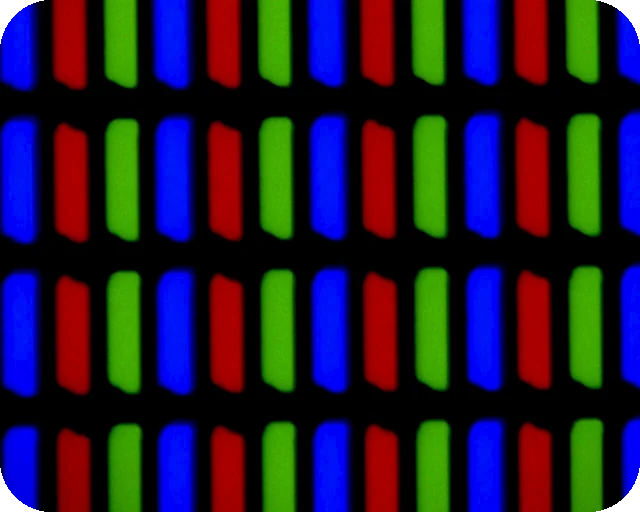
Look at Pure green from close up at full brightness. Every dot should be the same green. A black dot is a dead green subpixel; a red, blue or white dot means a subpixel is stuck on. Green is the brightest of the three primaries, so faults on it are easy to spot. Check red and blue as well, or use the dead pixel test to mark faults and download a map for your return.
Uniformity and tint
A flat green also shows uneven backlight well. Patches that look yellow green or darker are worth a closer look on the white screen and the black screen.
Green screen color code: hex and RGB
These are the hex codes and RGB values of the shades on this page, so you can type the same green into an editor or a design tool:
- Pure green: hex #00FF00, RGB 0, 255, 0. The brightest green a screen can show.
- Chroma key green: hex #00B140, RGB 0, 177, 64. It matches Pantone 354 C, the green most backdrops are made to.
- Forest green: hex #228B22, RGB 34, 139, 34.
- Dark green: hex #004D00, RGB 0, 77, 0.
Download a green screen background or video
Need green as a file? Choose the shade above, then use the Download panel. Download PNG saves a solid green screen background at Full HD, QHD, 4K, a phone size or a custom size up to 7680 pixels per side. Drop it into a video editor or a thumbnail as a plate to key out later, or use it as a placeholder background. Make video records a 10, 30 or 60 second green screen video at 1920 x 1080 and 30 fps, for editors that want a clip rather than a still.
The video is WebM. It plays in Chrome, Edge, Firefox and VLC and opens in most editors, but some phones, TVs and older Apple devices do not play it. Recording takes as long as the video, and nothing is uploaded.
Tips for a clean result
- This page cannot change your screen's brightness. Use the brightness keys or the monitor menu; for keying, lower is usually better.
- Turn off Night Light, Night Shift, f.lux and True Tone, which push the green towards yellow.
- Use the timer if you leave the green on for a recording session. While the colour shows, the page asks the browser to keep the screen awake.
- If your camera shows banding, set the shutter to 1/50 (Europe, most of Asia) or 1/60 (North America).
Blue screen vs green screen: green needs less light and keys most cleanly on digital cameras, while blue keys better when the subject wears green or has blond hair. Use the blue screen with its chroma key blue shade, or any exact shade from the colour screen picker.
Questions
Can I use a monitor as a green screen for keying?
Yes, for small setups. A monitor or tablet showing chroma key green works well behind a product, a figure or a head and shoulders shot. Turn the brightness down to roughly match the light on your subject, because a screen that is too bright spills green light onto the edges and makes keying harder.
Which green is best for chroma key?
Chroma key green, #00B140, is the usual starting point and the shade paint and fabric makers aim for. On a screen, pure green #00FF00 also keys well. Try both with your keyer (OBS Chroma Key, Premiere Ultra Key, DaVinci Resolve) and keep the one that gives clean edges.
How do I test green subpixels?
Show Pure green at full brightness and look closely. A black dot is a dead green subpixel. A red, blue or white dot is a subpixel stuck on. The dead pixel test runs through all six test colours.
Why does the green screen look yellow or blue on my monitor?
A wide gamut monitor shows #00FF00 as a very saturated green that can look neon. Night Light or True Tone adds yellow. Turn those off, and use the sRGB mode on the monitor if it has one.
Why do I see a pattern or flicker when I film the screen?
Cameras pick up the screen refresh and the pixel grid. Put the screen out of focus behind your subject, lower its brightness, and set the camera shutter to 1/50 or 1/60 to match your power grid.
Does it work on a phone or TV?
Yes. On iPhone the green fills the browser window instead of going full screen; turn the phone sideways. On a TV, open the page in its browser or cast a browser tab.
Can I download a green screen background?
Yes. Pick a shade, then use the Download panel. Download PNG saves a solid green screen background at 1920 x 1080, 4K, a phone size or any custom size, and Make video records a 10, 30 or 60 second green screen video in WebM. Both are made in your browser.
What is a green screen, and what color is it?
A green screen is a backdrop of one even, bright green that video software removes and replaces with another picture, a technique called chroma keying. Most are close to chroma key green, about #00B140, but any saturated green that is evenly lit will key.
When was green screen invented?
Keying started with blue: Larry Butler used a blue screen travelling matte for The Thief of Bagdad in 1940, and Petro Vlahos refined the process in the late 1950s. Green became the usual choice with digital video from the 1990s, because camera sensors have twice as many green photosites as red or blue, so green keys cleanly with less light.
How much is a green screen?
This website is free, both as a full screen colour and as a download. A basic green fabric backdrop costs roughly 15 to 40 US dollars, and a collapsible pull up green screen that stands behind a desk chair usually costs around 100 to 200 dollars.
How do I choose a green screen?
Pick a matte, non-shiny material that you can keep free of wrinkles, large enough to fill the frame behind you with some margin. Choose blue instead if you wear green or have blond hair, and plan to light the backdrop evenly, separately from the light on you.
How do I change the green screen color in Photoshop?
To turn the green into another colour, use Image, Adjustments, Replace Color and click the green. To remove it, use Select, Color Range on the green, invert the selection and add a layer mask, then put any background on a layer below.
More tests
 Dead pixel testFull screen colours to spot dead and stuck pixels
 Black screenA full black screen, one clickWhite screenA full white screen, one click
 Refresh rate testYour monitor Hz, measured in the browser
 What is my screen resolutionScreen resolution, browser window size and pixel ratioMonitor size calculatorScreen size in inches, PPI and aspect ratio