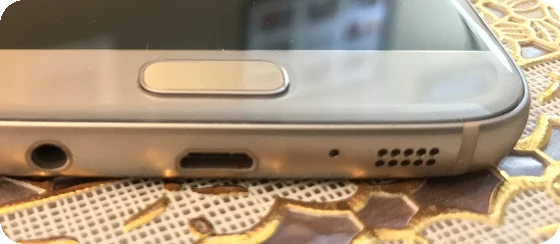
This water eject tool plays a low tone that helps get water out of your phone speaker after it gets wet: a splash, rain, the pool or the shower. It works as a speaker cleaner sound for iPhone and Android in the browser, with no app and no shortcut to install. The default is the familiar 165 Hz water eject sound, played in pulses for about a minute; you can switch to 120, 200 or 250 Hz or a steady tone. When the water is out, three more modes help you fix your speaker sound: a dust and rattle sweep, a left and right test, and a frequency sweep that shows which tones the speaker can still play. The page explains how sound pushes water out of a speaker, what Apple and Samsung advise for wet phones, Apple Watch Water Lock and AirPods, and, just as important, what a sound cannot fix. On Android phones, Vibrate mode can also pulse the phone's vibration motor, alone or together with the sound.
How does water eject work?
A phone speaker is a tiny cone (a diaphragm) driven by a coil and a magnet, sitting behind a grille or mesh with very small holes. Water gets into those holes and stays there, held by surface tension. Sound comes out muffled, crackly or quiet because the water blocks the air the cone has to push.
When the speaker plays a tone, the cone moves back and forth at that frequency, 165 times a second for 165 Hz, and pushes air through the grille on every stroke. Low tones work best because the cone has to move further to make sound at low frequencies. The sound pressure a speaker makes follows how fast the cone accelerates, which grows with the square of the frequency; so to be equally loud, a cone playing 165 Hz has to travel about 37 times as far as one playing 1 kHz. Small phone speakers cannot play deep bass loudly, so the low tone sounds buzzy and not very loud, but the cone is moving as far as it can. Those big strokes pump air through the holes and shake the droplets loose.
Pulses add a jolt every time the tone starts and stops. The default pattern plays 2 seconds on and 0.5 seconds off: 24 bursts and about 7,920 cone strokes in one minute. Apple Watch uses the same principle: when you turn off Water Lock, it plays a series of tones to clear water from its speaker.
Worked example: one minute of water eject
At 165 Hz with the default pattern, the tool plays 24 bursts of 2 seconds. The first burst fades in over 2 seconds in case the volume is already up, and each burst fades in and out over 40 ms so it does not click. The tone peaks at 90% of full scale, just below the point where the browser would clip it into a harsh, distorted square wave. After 60 seconds the sound stops by itself.
| Mode | What it plays | Length | Level |
|---|---|---|---|
| Water eject | 165 Hz sine in 2 s pulses (or steady; 120, 200, 250 Hz) | 30, 60, 120 s | 90% |
| Dust and rattle | Sine gliding 60 to 400 Hz and back, twice | 40 s | 60% |
| Left and right | Noise bursts, left then right, 4 times | 12 s | 35% |
| Frequency sweep | Sine gliding from 20 Hz to 20 kHz, log scale | 30 s | 25% |
| Vibrate | Phone vibration motor, 2 s on, 0.5 s off, alone or with the water eject tone (Android only) | 60 s | 90% with sound |
How far the cone has to move for the same loudness, compared with a 1 kHz tone:
| Tone | 100 Hz | 165 Hz | 250 Hz | 500 Hz | 1 kHz | 4 kHz |
|---|---|---|---|---|---|---|
| Cone travel | 100x | 37x | 16x | 4.0x | 1.0x | 0.06x |
How to use water eject: step by step
Step 1: Take off the case and your headphones
Remove a case that covers the speaker, disconnect Bluetooth headphones and speakers, and never play the tones with earbuds or headphones in your ears.
Step 2: Hold the speaker facing down
Hold the phone so the speaker grille points at the floor, over a soft cloth. On most phones the main speaker is on the bottom edge.
Step 3: Press Start, then raise the volume
Start at a low volume, then turn the media volume up to full for water eject. The tool plays 165 Hz pulses for about a minute and stops by itself.
Step 4: Wipe and repeat
Wipe off the droplets that come out. If the sound is still muffled, run it two or three more times, then leave the phone to dry in open air.
Step 5: Check the speaker
Use the left and right test and the frequency sweep to hear whether the speaker sounds normal again.
How to get water out of an iPhone speaker
Hold the iPhone with the bottom speaker facing down and run water eject at full volume; the earpiece at the top is a second speaker, so turn the phone over and run it again with the top facing down if calls sound muffled. Apple's own advice for a wet iPhone is to wipe it with a soft, lint-free cloth, tap it gently against your hand with the connector facing down, and leave it in a dry place with some airflow. To check the speaker, Apple suggests placing the phone speaker side down on a lint-free cloth to see if water drips out. Apple warns against drying it with a heat source or compressed air, against pushing anything into the openings, and against rice, whose small particles can get into the phone. If you see a liquid detection alert, do not charge with a cable until the port is dry; Apple says to allow at least 5 hours.
The Water Eject shortcut
The Water Eject shortcut that many people search for is a third-party Siri shortcut, not an Apple feature. It plays a low tone through the speaker, the same idea as this page. This page needs nothing installed, works in Safari, and lets you see the tone, the countdown and the waveform. If you hear nothing, check the media volume and the ring/silent switch or silent mode, and that no Bluetooth device is connected.
How to get water out of an Android phone speaker
The steps are the same on Samsung Galaxy, Pixel and other Android phones: case off, speaker down, Start, media volume to full. Samsung's own advice for a water resistant phone that got wet is to wipe it with a dry, soft cloth, hold it speaker face down and shake it gently a few times, and let it dry completely. Samsung also says moisture on the speaker mesh can be cleared by the speaker's vibration during a call, which is the same effect this tool uses on purpose. On Samsung phones, the Samsung Members app has speaker and receiver checks under Diagnostics.
Vibrate mode: can shaking the phone get water out?
Vibrate mode pulses the phone's own vibration motor, 2 seconds on and 0.5 seconds off for 60 seconds, in step with the water eject pulses. Pick Sound + vibrate to run it together with the 165 Hz tone, or Vibrate only when you cannot play sound. Shaking can help loosen droplets that sit near the grille, much like Samsung's advice to shake the phone gently with the speaker facing down. The sound still does most of the work, because it moves the speaker cone itself, right behind the grille, while the motor shakes the whole phone. Neither repairs a damaged speaker.
A web page can only vibrate a phone through the Vibration API, and that works in Chrome, Samsung Internet and Edge on Android. Safari on iPhone and iPad does not support it, and laptops and desktop computers have no motor, so the page shows a note there instead of a button that does nothing. On iPhone, use the water eject sound; to feel the haptics, open Settings > Sounds & Haptics, tap Ringtone and then a vibration pattern. If an Android phone does not vibrate, check that vibration is turned on in its sound and vibration settings. The vibration stops when the time runs out, when you press Stop and when you leave the tab.
Apple Watch water eject: Water Lock
Apple Watch has water eject built in, so you do not need this page for it. Turn on Water Lock in Control Center before swimming (it turns on by itself for water workouts). Afterwards, press and hold the Digital Crown until the display says Unlocked: the watch plays a series of tones to clear water from its speaker. On watchOS 8 or earlier you turn the Digital Crown instead. Apple advises against pushing anything into the speaker or microphone openings.
AirPods and earbuds water eject
Apple's advice for wet AirPods is to wipe them with a soft, dry, lint-free cloth and let them dry for at least two hours before using them or putting them in the case, with no heat or compressed air. AirPods and other earbuds are sweat and water resistant to different ratings, not waterproof, and most are not made for swimming. If you want to try water eject on earbuds, connect them, take them out of your ears, hold them with the speaker nozzle facing down and play it at a moderate volume. Never play the tones with earbuds in your ears.
Laptop and Bluetooth speaker water
For a waterproof Bluetooth speaker, turn it so the grille faces down and play water eject through it at a high volume; its larger cone moves a lot of air. A laptop is different: if you spill a drink on a laptop, switch it off, unplug it and let it drain. Do not play sound to dry it, because liquid inside a laptop is a risk to the electronics, not just to the speaker.
Speaker cleaner: does sound clean dust out of a speaker?
Sound helps with water because droplets sit loosely in the holes. Dust, lint and pocket fluff are different: they get packed into the grille or stuck to the mesh, and the cone's vibration will not pull them out. The dust and rattle sweep can shake loose a few dry particles and helps you hear a rattle, but an honest speaker cleaner for dirt is a brush, not a sound.
How to clean a phone speaker grille safely
- Switch the phone off and take off the case.
- Brush the grille gently with a clean, soft, dry brush, such as a soft toothbrush, with the speaker facing down so the dirt falls out.
- Do not pour or spray liquids into the grille, and do not use pins, needles or toothpicks: they can puncture the mesh behind it. Apple also advises against compressed air for a wet iPhone.
- For AirPods, Apple publishes its own mesh cleaning method in its AirPods cleaning guide.
- If the speaker stays muffled when clean and dry, see a repair shop or the maker's service centre.
Fix my speaker: muffled, crackling or quiet phone speaker
Most people who search "fix my speaker" or "fix my speakers" have a phone that got wet and now sounds muffled, and that is exactly what the water eject sound above is for. If the sound was already bad before any water, it is a different problem, and a sound alone will not repair it: this section helps you tell which one you have, and when speaker repair is the real answer. Before you blame water, check the simple things: a case or screen protector covering the speaker, a Bluetooth device the sound went to instead, media volume turned down, or Do Not Disturb. Restart the phone. Then:
- Muffled after getting wet: run water eject two or three times, then let it dry for a few hours. Water behind the grille needs time to evaporate.
- Crackling or buzzing: run the dust and rattle sweep at a moderate volume. A buzz at the same frequency every time points to a loose part or debris on the cone.
- One side silent: run the left and right test. Many phones use the earpiece as the second stereo speaker.
- No sound at all, or distortion when dry: a blown or damaged speaker cannot be fixed by any sound. That needs a repair shop.
Sound to get water out of a phone: why 165 Hz?
The 165 Hz sound comes from the first water eject websites and shortcuts, and it stuck. There is no published standard: any low tone your speaker can play loudly, roughly 100 to 300 Hz, moves the cone a long way. Much lower and phone speakers barely respond; much higher and the cone travel drops off fast, as the table above shows. That is why the tool offers 120, 200 and 250 Hz as well. If one tone sounds louder on your phone, that is the one that moves your speaker most.
Phone speaker test after water
When the water is out, use the left and right mode: bursts should come only from the side shown (on many phones, the bottom speaker and the earpiece). Then run the frequency sweep and tap Mark when the tone appears and when it fades. Phone speakers usually start to play somewhere in the low hundreds of hertz; your own hearing sets the top mark. For a full speaker test with fixed tones, polarity, bass rattle and surround channels, use our sound test, and for the highest tone you can hear, the hearing frequency test.
Is the water eject sound safe for my speaker?
A clean sine tone at full volume for a minute is a normal load for a phone speaker. The tool keeps the tone just below clipping, so it stays a pure tone rather than a distorted one, and it stops on its own. Stop it if you hear harsh rattling, if the phone gets warm, or if the sound gets worse. Never play it with earbuds or headphones in your ears.
Why we built this water eject tool
When a phone gets wet, the first question is whether the speaker is damaged or just full of water. Most water eject pages give one button and a promise; some describe it as "advanced frequency technology", and few say what the sound cannot do, such as remove dust or fix a blown speaker.
Nitin Raja, who builds this site, tested a lot of these pages before building this one, and kept what people need: one big Start button that plays nothing until you press it, the physics in plain words, what Apple and Samsung actually advise, and a quick way to check the speaker afterwards.
What this water eject tool plays and measures
The tool generates sound in your browser with the Web Audio API; there is no audio file to download. This is exactly what each mode plays, as the code runs it:
- Water eject: a 165 Hz sine (or 120, 200 or 250 Hz), 2 s on and 0.5 s off, at 90% of full scale, for 30 seconds, 1 minute or 2 minutes. The first 2 seconds fade in.
- Dust and rattle: a sine gliding from 60 to 400 Hz and back every 20 seconds, 40 seconds in all.
- Left and right: noise bursts on one channel at a time, 1.5 seconds per side, 4 rounds.
- Frequency sweep: a sine from 20 Hz to 20 kHz on a log scale over 30 seconds; Mark records the frequency at the moment you tap.
- Vibrate: the Vibration API (navigator.vibrate) with one pattern of 2 s on and 0.5 s off for 60 seconds, with or without the water eject tone. It stops by itself, when you press Stop or when the tab is hidden.
- The waveform is the signal the page sends to your speaker, read back inside the browser.
It does not use the microphone and does not measure whether water is gone or how your speaker sounds: you judge that by ear. The sweep marks depend on your speaker, your hearing and the volume. Sources were last checked October 25, 2026.
Why this water eject tool is different
- Nothing plays on load. Sound starts only when you press Start, and every mode stops by itself.
- Honest about limits. It says plainly that sound helps with water droplets, not with packed dust or a damaged speaker.
- The method is shown: the tone, the pulse pattern and the levels are on this page, drawn from the same numbers the tool plays.
- Five modes in one place: water eject, vibrate, a rattle sweep, left and right, and a frequency sweep to check the speaker afterwards.
- Vibrate mode where it really works: on Android phones the motor pulses with or without the sound; iPhone and computers get a clear note instead of a button that does nothing.
- No app, no account, no microphone, and a link that keeps your mode and settings.
| This water eject tool | Typical water eject page | |
|---|---|---|
| Sound on load | Never; only after Start | Usually a play button |
| Tone choice | 165 Hz default, 120, 200 or 250 Hz, pulses or steady | Often one fixed tone |
| Auto-stop and countdown | Yes, every mode | Some |
| Speaker check afterwards | Left and right, rattle sweep, frequency sweep | Rarely |
| Vibration | Android phones, alone or with the sound; a clear note on iPhone and computers | Some |
| What it cannot do | Stated: dust, lint, damaged speakers | Rarely mentioned |
| Sources | Apple and Samsung support pages linked | Rarely |
How well does water eject work? Limits
- It helps with droplets in the speaker grille and the channel behind it, which cause most muffled sound after a splash. Water deeper inside has to evaporate.
- We found no published lab test of water eject on phone speakers, so we do not claim a success rate. Apple's Water Lock and Samsung's note on speaker vibration show the principle is sound.
- It does not repair a blown or damaged speaker, remove packed dust or lint, or fix water damage to the phone. Liquid damage is generally not covered by warranty, so if the phone acts strangely after getting wet, switch it off and see a repair shop.
- How far the cone moves depends on your phone's speaker and the volume. Turn the media volume to full for water eject.
Sources
Checked on October 25, 2026:
- Apple Support: How to use Water Lock and eject water from your Apple Watch
- Apple Support: About Apple Watch water resistance
- Apple Support: About splash, water and dust resistance of iPhone
- Apple Support: If you see a liquid-detection alert on your iPhone
- Apple Support: About the sweat and water resistance of AirPods
- Apple Support: How to clean your AirPods
- Samsung Support: How to remove external factors that affect the sound of a mobile device
- Samsung Support: What to do when a Samsung mobile device is exposed to water and the call sound is affected
- MDN Web Docs: OscillatorNode (Web Audio API)
Water eject FAQ
Does water eject really work?
It can help. Low tones make the speaker cone move the furthest, which pumps air through the grille and shakes out droplets sitting in it. Apple Watch uses the same idea with its built-in Water Lock, and Samsung says moisture on a speaker mesh can be cleared by speaker vibration. Water that has gone deeper into the phone has to evaporate, which takes hours.
Why 165 Hz?
165 Hz was made popular by the first water eject websites and iPhone shortcuts. There is no standard frequency: any low tone that your speaker can play loudly, roughly 100 to 300 Hz, moves the cone a long way. You can pick 120, 200 or 250 Hz under More options.
How long should I play the water eject sound?
One run of about a minute is usually enough to clear droplets from the grille. If the sound is still muffled, run it two or three more times with the speaker facing down, then let the phone dry in open air for a few hours.
Can the water eject sound damage my speaker?
Playing a clean low tone at full volume for a minute is within what phone speakers are built for. Stop if you hear harsh rattling or buzzing, if the phone gets warm, or if the sound gets worse. Never play it with earbuds or headphones in your ears.
Does the iPhone have a built-in water eject?
No. Apple Watch has Water Lock, which plays tones to clear its speaker, but iPhone has no such button. The Water Eject shortcut is a third-party Siri shortcut that plays a similar low tone; this page does the same in the browser with nothing to install.
Does vibrating my phone help get water out of the speaker?
It can help a little. Shaking can loosen droplets near the grille, which is why Samsung suggests shaking the phone gently with the speaker facing down. The sound does most of the work, because it moves the speaker cone itself. Vibrate mode pulses the motor on Android phones in Chrome or Samsung Internet, alone or with the 165 Hz sound; iPhone and computers cannot vibrate from a web page. Neither repairs a damaged speaker.
Can a sound clean dust out of my speaker?
Not really. Vibration can shake loose a few dry particles, but packed dust, lint and pocket fluff stay where they are. Clean the grille gently with a soft, dry brush, and do not push pins or needles into the holes.
Should I put my wet phone in rice?
No. Apple advises against rice because small particles can get into the phone. Wipe it, tap it gently with the connector facing down, and leave it to dry in a dry place with some airflow. Do not use a hair dryer or other heat.
Why does my phone speaker still sound muffled?
Water can sit behind the grille for hours after the droplets are gone, so give it time. If it is still muffled after a day, check for a case or screen protector covering the speaker and for dirt in the grille. A speaker that crackles or stays quiet when dry may be damaged and needs a repair shop.
Related tools
 Sound testSpeaker and headphone test: left, right, sweep and bass
 Hearing frequency testThe highest and lowest tones you can hear (not a medical test)
 Mic testLevel, clipping, noise floor and a playback check
 Decibel meterSound level in dB from your microphoneAudio latency testSpeaker to microphone delay, measured with a click
 Touch screen testMulti touch points and dead spots on phones and tablets