How to test a Mac keyboard
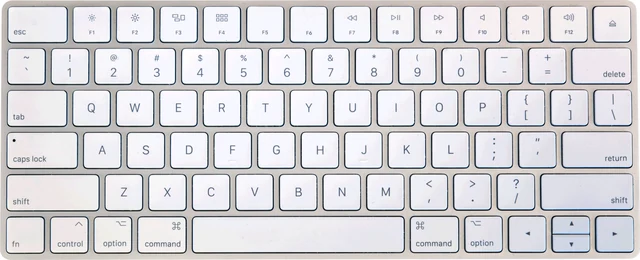
Click the keyboard picture, then press every key once, left to right, row by row. Each key turns black while you hold it and green once macOS has passed it to the page. The meter shows how many of the keys a browser can read you have tested. Choose Magic Keyboard with numeric keypad if yours has the number pad and the F13 to F19 keys. Pick your layout if you use a British, German, French or other Mac keyboard.
On a MacBook, press each key in the middle and near its edges. Butterfly keys often fail only when pressed off centre, and that is easy to miss.
Keys a browser cannot see on a Mac
- fn (Globe) and Touch ID are handled by the keyboard and macOS, so no web page receives them. They have a dashed outline and are not counted. Test fn by holding it with F1: you should get F1 instead of a brightness change.
- The top row controls brightness, Mission Control, Spotlight, dictation, media and volume. macOS acts on those itself. Hold fn to test them as F1 to F12, or switch the default in System Settings.
- System shortcuts such as Command+Tab, Command+Space, Command+Q, Control+arrow keys and the screenshot shortcuts never reach the page. Press each modifier on its own to test it.
- Browser shortcuts such as Command+W, Command+T and Command+L belong to the browser. In Chrome and Edge, full-screen mode passes most of them to the test.
- Touch Bar keys on MacBook Pro models from 2016 to 2021 are a screen, not keys. Hold fn to show F1 to F12 on the Touch Bar, and tap them to test them here.
A quirk worth knowing: while Command is held, macOS does not tell the browser when other keys are released. The test releases them when you let go of Command, so nothing looks stuck.
MacBook keyboard problems
Butterfly keyboards, about 2015 to 2019
The 12-inch MacBook, the MacBook Air from 2018 and 2019, and the MacBook Pro from 2016 to 2019 use a very thin butterfly mechanism. A speck of dust can stop a key, make it repeat, or make it miss presses. Apple's own advice is to hold the laptop at about 75 degrees, spray compressed air across the keys in a left to right motion, then turn it and repeat from other sides. Apple later returned to a scissor mechanism, called Magic Keyboard, starting with the 16-inch MacBook Pro in late 2019.
The keyboard service program
Apple ran a keyboard service program for butterfly MacBook, MacBook Air and MacBook Pro models, with free repairs for four years after each laptop was first sold. For most of these Macs that has ended. Look up your serial number on Apple's support site anyway, and if a repair is refused, ask about your rights under local consumer law.
Sticky, repeating or doubled keys
If a key types twice, run the keyboard chatter test on it. If it cuts out while held, use the key drop test. If a whole row fails, the cause is usually the keyboard connector or liquid damage, which needs a repair.
Keyboard settings on macOS
- System Settings, Keyboard: key repeat rate, delay until repeat, what the fn or Globe key does, and keyboard brightness.
- Keyboard Shortcuts, Function Keys: use F1, F2 and the others as standard function keys.
- Keyboard Shortcuts, Modifier Keys: swap Command and Option for a Windows keyboard, or remap Caps Lock, per keyboard.
- Text Input, Input Sources: if keys type the wrong characters, check the layout here.
- Accessibility, Keyboard: Slow Keys makes keys need a long press and Sticky Keys holds modifiers on. Turn them off if keys seem to need holding.
When you connect a keyboard macOS does not know, the Keyboard Setup Assistant asks you to press the key next to left Shift to tell an ANSI, ISO or JIS keyboard apart. If it got that wrong, a few symbols will be in the wrong place. For PC keyboards and all Windows layouts, use the main keyboard test.
Questions
How do I test my MacBook keyboard?
Open this page in Safari, Chrome or Firefox, click the keyboard picture and press every key once. Each key lights while held and turns green when your Mac receives it. The meter counts down to Test complete. Keys that stay grey after a firm press are not reaching macOS.
Why does the fn or Globe key not light up?
The fn key, shown as a globe on newer Macs, is handled inside the keyboard and by macOS, and browsers do not get it as a normal key. That is why it has a dashed outline and is not counted. Test it by using it: fn plus F1 should send F1 instead of lowering the brightness.
Why do F1 to F12 change brightness instead of lighting up?
On a Mac the top row controls brightness, Mission Control, media and volume by default, and macOS uses those before a web page sees them. Hold fn while pressing them, or turn on "Use F1, F2, etc. keys as standard function keys" under System Settings, Keyboard, Keyboard Shortcuts, Function Keys.
Why can the test not see Command+Tab, Command+Space or Command+Q?
macOS keeps those shortcuts for itself: app switching, Spotlight and quitting the browser. Command+W and Command+T belong to the browser. Press Command on its own to test it. In Chrome and Edge, full-screen mode passes more shortcuts to the page, but never the system ones.
My MacBook keys stick or type twice. Is it the butterfly keyboard?
If your MacBook, MacBook Air or MacBook Pro is from about 2015 to 2019 and keys stick, repeat or do nothing, the butterfly keyboard is the likely cause. Its very thin mechanism jams on small specks of dust. Run the chatter test on any key that types twice, then try compressed air as Apple describes.
Does Apple still repair butterfly keyboards for free?
Apple ran a keyboard service program for butterfly-keyboard MacBook models that covered repairs for four years after the first retail sale. For most of those laptops that window has now closed. Check Apple's support site with your serial number before you pay for a repair, and ask about consumer law where you live.
Can I test a Windows keyboard on a Mac?
Yes. macOS treats the Windows key as Command and Alt as Option, so they light up as Command and Option here. If they feel swapped, change them in System Settings, Keyboard, Keyboard Shortcuts, Modifier Keys, choosing that keyboard from the menu. The main keyboard test has the full Windows layouts.
Why does Caps Lock need a firm press on a Mac?
Apple keyboards ignore a very short tap on Caps Lock so you do not switch it on by accident. Press it a little longer. In many Mac browsers Caps Lock reports a press when it turns on and a release when it turns off; the test counts either one, so the key turns green on the first try.
More tests
 Keyboard testPress every key, with ISO, AZERTY and QWERTZ layoutsGhosting testHow many keys register at once
 Keyboard chatter testFind keys that type twice (double typing)Keyboard latency testInput delay and jitter your browser seesKey drop testHold a key and catch signal dropsKeyboard polling rate testEstimate your keyboard report rate (Hz)