What a red screen is good for
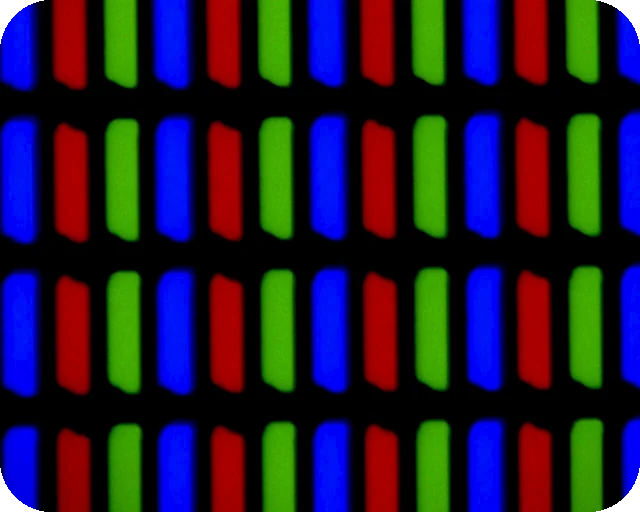
A pure red image (RGB 255, 0, 0) lights only the red subpixel in each pixel. The green and blue ones stay dark. That makes red useful in two quite different ways: as a light that hardly disturbs your dark-adapted eyes, and as a test for one third of your panel.
You get a blank red screen in one click on a PC, Mac, phone or TV browser, with no need to find a red screen YouTube video and hide its controls.
A night light that keeps your eyes adjusted
Astronomers, sailors and pilots use dim red light at night for a reason. The rod cells that let you see in the dark are almost blind to deep red, so a weak red light does not undo the 20 to 30 minutes it takes your eyes to adjust. Choose Night red, turn the screen brightness to its lowest step and point the screen away from you. It is enough to read a star chart, check a camera dial or walk across a room. Bright pure red at full brightness is too much and will still dazzle you.
Darkroom style work
Black and white photo paper is mostly insensitive to red, which is why darkrooms use red or amber safelights. A screen can stand in for a small job, but treat it with suspicion: LCD screens let a little backlight through every colour, and phones may add a white status bar. Use Night red, the lowest brightness, keep it well away from the paper, and make a fog test first (a coin on a strip of paper for a few minutes, then develop; if you can see the coin, the light is not safe). Colour paper and film need total darkness.
Test the red subpixels
On pure red, every red subpixel should glow evenly. Look for a black dot (a dead red subpixel), or a dot of green, blue or white (a subpixel stuck on). Then check the green screen and blue screen too, or run the dead pixel test, which steps through all six test colours and lets you mark faults for a return.
Mood light, alarms and video
A red screen works as a mood light for a party or a horror movie night, as a stand-in for a warning light in a video, or as a red background for a product photo. Deep red on an OLED phone looks rich because the other subpixels are fully off.
Brightness and colour tips
- This page cannot change your screen's brightness. Use the brightness keys, the slider in Windows Settings or macOS Control Center, or the picture menu on a monitor or TV.
- Turn off Night Light, Night Shift, f.lux and True Tone if the red looks orange.
- On a laptop or phone, switch off automatic brightness so the screen does not change while you use it.
- While the red shows full screen, the page asks the browser to keep the screen awake. The Turn off after timer ends it, so the computer can sleep again.
Download a red image or video
The Download panel turns the shade you picked into a file. Download PNG saves a solid red image at Full HD, QHD, 4K, a phone size or any custom size up to 7680 pixels per side, which works as a wallpaper, a slide background or a backdrop in a video edit. Make video records a red screen video of 10, 30 or 60 seconds at 1920 x 1080 and 30 fps. The video is WebM, which plays in Chrome, Edge, Firefox and VLC but may not play on every phone or TV. Both are made in your browser.
Other colours
For a warm reading light try the orange screen or yellow screen. For dust and dark pixels use the white screen, for bright pixels and backlight bleed the black screen. Need an exact shade? Use the colour screen picker.
Questions
Does a red screen help keep my night vision?
Dim red light does, bright red does not. The rods in your eyes that work in the dark are barely sensitive to deep red, so a dim red screen lets you read a chart or find a cable without resetting your dark adaptation. Use Night red and turn your screen brightness right down.
Can I use a red screen as a darkroom safelight?
Only with care. Most black and white papers ignore deep red light, but an LCD leaks some light from its backlight and no screen is a tested safelight. Use Night red at low brightness, keep the screen a few metres away, and run a fog test with a coin on a test strip first. Never use it for colour paper or film.
How do I check red subpixels for faults?
Show Pure red at full brightness and look closely. A dark dot means the red subpixel there is dead. A green, blue or white dot means another subpixel is stuck on. The dead pixel test checks all colours in one run.
Why does my red look orange or pink?
Night Light, Night Shift, f.lux, True Tone and reading modes shift the colour. Turn them off. A cheap or old panel may also not reach a deep red; that is the panel, not the page.
Can I make it turn off by itself?
Yes. Choose a time under "Turn off after" before you go full screen. The red closes after that many minutes and your computer can sleep again as usual.
Is a red screen better than the blue light filter?
They do different jobs. A blue light filter warms everything you look at. The red screen is a plain light with almost no blue in it. For reading at night, the warm yellow or orange screens are easier on the eyes than red.
What does a red screen mean on a PC?
On this page it is just a plain red colour. If your PC monitor turns red by itself, the green and blue signals are often missing: reseat or swap the video cable, try another port and update the graphics driver. A full page red warning in your browser means it blocked a site it thinks is dangerous, so go back unless you trust the site.
Can I download a red screen image or video?
Yes. Pick a shade, then use the Download panel under the screen. Download PNG saves a solid red image at 1920 x 1080, 4K, a phone size or a custom size, for example as a wallpaper. Make video records a 10, 30 or 60 second red screen video in WebM format. Both are made in your browser and nothing is uploaded.
More tests
 Dead pixel testFull screen colours to spot dead and stuck pixels
 Black screenA full black screen, one clickWhite screenA full white screen, one click
 Refresh rate testYour monitor Hz, measured in the browser
 What is my screen resolutionScreen resolution, browser window size and pixel ratioMonitor size calculatorScreen size in inches, PPI and aspect ratio